ETABS and SAP2000
This guide provides detailed instructions for setting up the VIKTOR worker with the CSI software suite, focusing specifically on ETABS and SAP2000. The steps outlined are also applicable to other CSI tools. It is designed to offer the necessary context and file templates to facilitate the integration process.
There are two ways to integrate with the CSI software from an app. You can call the CSI API directly from your app
with vkt.etabs.connect() or vkt.sap2000.connect(), or you can send a Python script to the worker with
vkt.etabs.ETABSAnalysis, vkt.sap2000.SAP2000Analysis, or vkt.python.PythonAnalysis. Both need a worker;
Choose your approach compares them.
vkt.etabs.attach() and vkt.sap2000.attach() are variants of connect() that bind the session to the instance the
user already has open, instead of starting a new one. See
Attaching to a running instance.
The worker
A worker is a program that connects the VIKTOR platform to third-party software running outside the platform. You can install the worker on your local machine or a remote server, but the CSI software must be installed where the worker is located. Your VIKTOR app will handle the communication between the web app and the worker as shown in the following diagram.
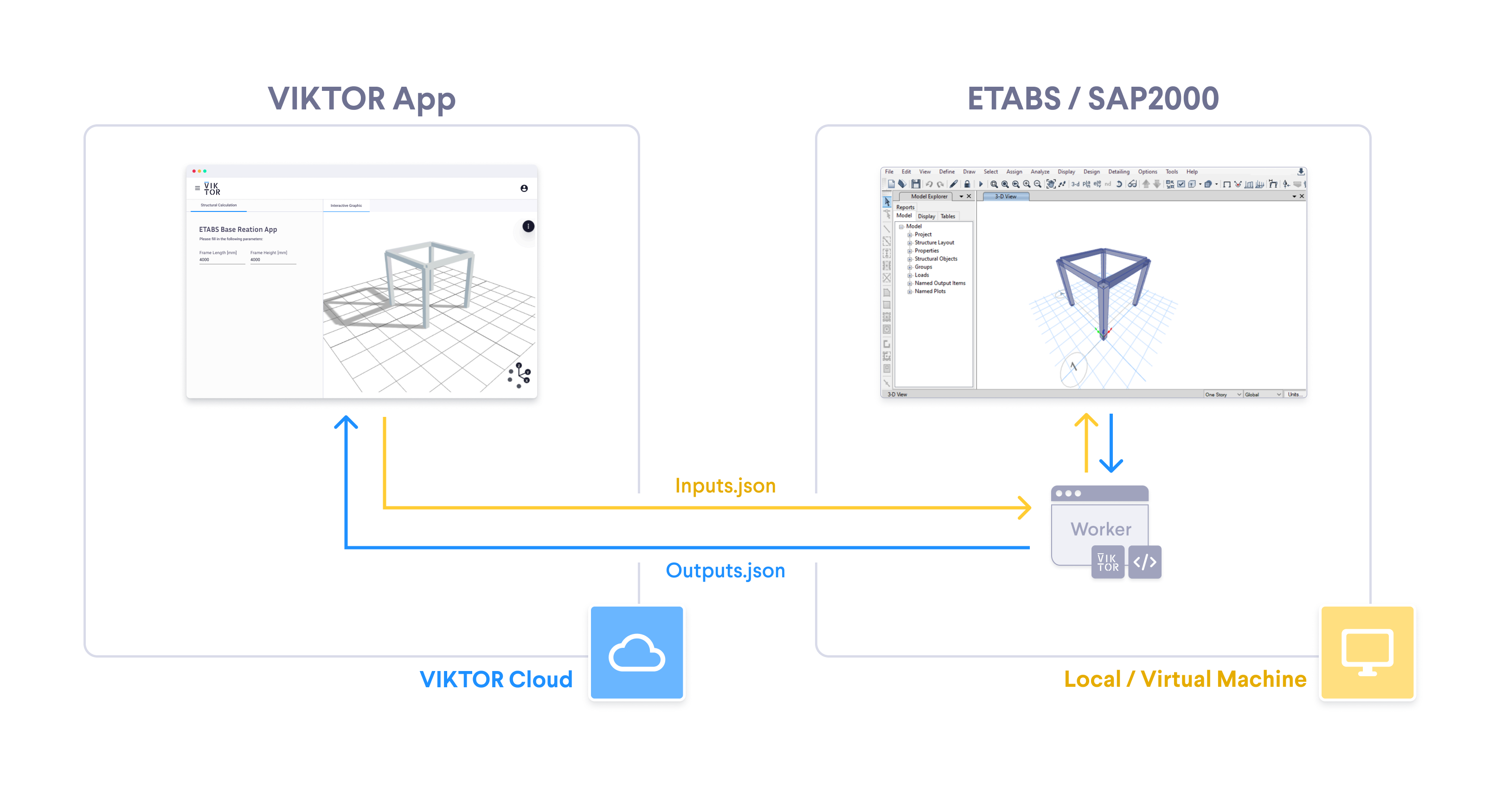
Here is what happens during the integration:
- The user enters input parameters in the VIKTOR UI.
- The
app.pyin the VIKTOR app sends a task to the worker - The worker (running on your local machine or a virtual machine) executes the task by using the CSI API.
- The worker returns the result of the calculation to your VIKTOR app.
- VIKTOR UI displays the result of the calculation.
The worker drives the real desktop application, so the machine it runs on needs a logged-in, interactive Windows session (a service running in Session 0 cannot start ETABS or SAP2000). The license must not prompt on startup either: nobody is there to answer a sign-in or activation dialog, so the app would only see a timeout.
Choose your approach
vkt.etabs.connect() / vkt.sap2000.connect() | vkt.etabs.ETABSAnalysis / vkt.sap2000.SAP2000Analysis / vkt.python.PythonAnalysis | |
|---|---|---|
| Worker integration | etabsconnect / sap2000connect | etabs / sap2000 / python |
| Where the API calls live | in your app | in a Python script that is sent to the worker |
Python + comtypes on the worker machine | not needed | required |
| Software | ETABS / SAP2000 | ETABS / SAP2000, and other CSI tools such as SAFE and CSiBridge* |
| Which instance is used | a fresh one, or the one already running when you use attach() | a fresh one, started by your script |
| SDK version | viktor >= 14.31.0 (ETABS), >= 14.32.0 (SAP2000), >= 14.33.0 for attach() | viktor >= v14.17.0 |
* SAFE and CSiBridge have no dedicated analysis class — use viktor.external.python.PythonAnalysis
directly and the python worker integration; see
Sending a Python script to the worker.
connect() is the preferred approach for integrations with ETABS and SAP2000, since you don't need any additional
configuration on the worker side. Use the script-based approach for other CSI tools, or to maintain an app that
already uses it.
Calling the API directly from your app
This is a BETA feature and requires SDK version >= 14.31.0 for ETABS, or >= 14.32.0 for SAP2000.
attach() requires >= 14.33.0 for both.
vkt.etabs.connect() and vkt.sap2000.connect() open a live
session with the CSI software on a connected worker and return the model object itself: sap is the CSI
SapModel, and every call on it is forwarded to that running instance and executed there. Use it as a context
manager — the session (and the ETABS or SAP2000 instance) exists only inside the with block:
- ETABS
- SAP2000
import viktor as vkt


class Controller(vkt.Controller):
    ...
    # A method inside the Controller opens the session and drives ETABS.

    def run_etabs(self, params, **kwargs):
        with vkt.etabs.connect(timeout=60) as sap:
            ret = sap.InitializeNewModel(vkt.etabs.eUnits.kN_m_C)  # a call returns the status code
            [beam_name, ret] = sap.FrameObj.AddByCoord(0, 0, 0, 6, 0, 0, "", "Default", "Beam", "Global")
            [pt_i, pt_j, ret] = sap.FrameObj.GetPoints(beam_name, "", "")  # ...or out-params, then status
            ret = sap.File.Save("model.edb")  # use a relative filename, not an absolute path
import viktor as vkt


class Controller(vkt.Controller):
    ...
    # A method inside the Controller opens the session and drives SAP2000.

    def run_sap2000(self, params, **kwargs):
        with vkt.sap2000.connect(timeout=60) as sap:
            ret = sap.InitializeNewModel(vkt.sap2000.eUnits.kN_m_C)  # a call returns the status code
            [beam_name, ret] = sap.FrameObj.AddByCoord(0, 0, 0, 6, 0, 0, "", "Default", "Beam", "Global")
            [pt_i, pt_j, ret] = sap.FrameObj.GetPoints(beam_name, "", "")  # ...or out-params, then status
            ret = sap.File.Save("model.sdb")  # use a relative filename, not an absolute path
Every member of the CSI API is reachable on sap. A call returns the API
status code (0 is success), or a list of the method's output parameters followed by that status code.
Please consider the following:
- Every call is a round trip to the worker, so prefer Open API methods that act on many objects at once over
long per-element loops.
timeoutbounds a single call, not the session. - File arguments must be relative filenames. Each session gets its own working directory on the worker, which is removed when the session closes; absolute paths are refused.
- The current version of
connect()doesn't support returning models created using the worker. Read the results you need through the CSI API (sap.Results...) while the session is open. connect()always starts its own, empty ETABS or SAP2000 instance. To work on an instance that is already running on the worker machine, useattach()instead; see Attaching to a running instance.- The object models of ETABS and SAP2000 are similar but not identical: the model file is an
.edbfor ETABS and an.sdbfor SAP2000, the self-weight load case is calledDeadin ETABS andDEADin SAP2000, and enumeration members are each product's own. Check the CSI documentation of the product you are targeting instead of porting code across.
Attaching to a running instance
vkt.etabs.attach() and
vkt.sap2000.attach() open the same
kind of session as connect(), with one difference: they bind to the ETABS or SAP2000 instance that is already
running on the worker machine instead of starting a fresh, empty one. The app acts on the model the engineer has open
on screen, and the changes it makes appear in their own window.
attach() is a BETA feature and requires SDK version >= 14.33.0.
This is a personal-worker workflow. The engineer runs the worker and the CSI software on their own machine (see VIKTOR Desktop), so the model they are working on is on the same host the session lands on. A worker on a hosted machine has no interactive desktop session, and therefore nothing to attach to.
- ETABS
- SAP2000
import viktor as vkt


class Controller(vkt.Controller):
    ...

    def check_open_model(self, params, **kwargs):
        try:
            with vkt.etabs.attach(timeout=60) as sap:
                [pt_i, pt_j, ret] = sap.FrameObj.GetPoints("B1", "", "")  # reads the model that is open
                ret = sap.View.RefreshView()  # a change shows in the user's own window
        except vkt.errors.WorkerSessionAttachError as err:
            raise vkt.UserError(f"Could not attach to ETABS ({err.reason}). Open your model and try again.") from err
import viktor as vkt


class Controller(vkt.Controller):
    ...

    def check_open_model(self, params, **kwargs):
        try:
            with vkt.sap2000.attach(timeout=60) as sap:
                [pt_i, pt_j, ret] = sap.FrameObj.GetPoints("B1", "", "")  # reads the model that is open
                ret = sap.View.RefreshView()  # a change shows in the user's own window
        except vkt.errors.WorkerSessionAttachError as err:
            raise vkt.UserError(f"Could not attach to SAP2000 ({err.reason}). Open your model and try again.") from err
The two are strictly separate:
connect()always opens a new instance, it never attaches to an existing instance.attach()always attaches to a running instance, it will fail if there is no running instance.
What changes once the session is attached:
- Closing the session detaches from the instance without closing it. The user can carry on working in the model afterwards. Session close, a worker restart and the idle timeout never close an attached instance.
- The app can change the attached model, but it cannot save it in place. File arguments keep the same restriction as
connect():sap.File.Save("model.edb")takes a relative filename and writes into the session's own working directory, which is removed when the session closes. - With several instances of the same product running, the session binds whichever one the CSI API hands back, and you cannot choose between them. Keep a single instance open on the worker machine when an app attaches to it.
timeoutbounds the attach itself as well as each later call, so keep it at 30 seconds or more.
If the attach fails, vkt.errors.WorkerSessionAttachError is raised and
no session is established. Its reason attribute names the cause, for example "error_attach_no_instance" when
nothing is running on the worker machine, or "error_attach_wrong_product" when the running instance belongs to the
other CSI product. The set of reasons is open-ended, so handle a value you do not recognise as a generic attach
failure. Once the session is established, losing the instance (the user closes ETABS, for example) raises
vkt.errors.WorkerSessionError, exactly as it does for connect(). WorkerSessionAttachError is a subclass of
WorkerSessionError, so except vkt.errors.WorkerSessionError catches a failed attach as well as a lost session.
Add integration to app config
To make the worker integration available through the interface, add the following to your viktor.config.toml:
- ETABS
- SAP2000
worker_integrations = [
    "etabsconnect",
]
worker_integrations = [
    "sap2000connect",
]
Install the worker
This worker calls the CSI API directly, so it needs no Python environment on the worker machine.
For SAP2000, follow the same steps, selecting the SAP2000 integration instead of ETABS.
Follow these steps to install the worker:
- Personal worker
- Organization worker
A personal worker connects the software that is installed on your own machine, for your own use. Personal workers are installed and managed with VIKTOR Desktop:
-
Download and install VIKTOR Desktop and log in with your VIKTOR account, if you haven't done so already
-
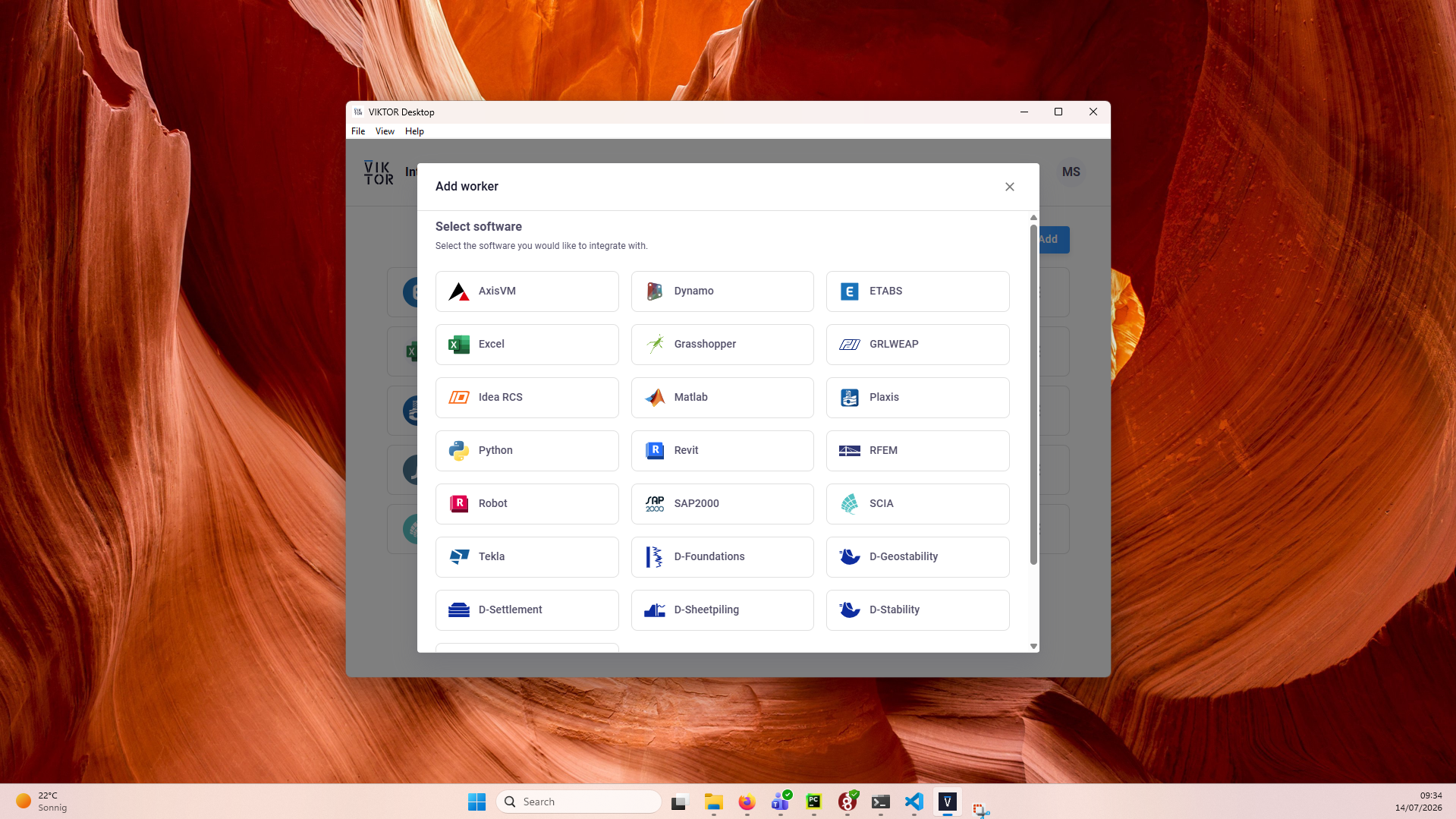
In VIKTOR Desktop, click "Add" and select ETABS
-
Start the worker. You can view its logs inside VIKTOR Desktop, and the editor shows when your worker is online
Personal workers that were installed with the previous per-worker installer keep running, but new personal workers can only be added through VIKTOR Desktop: the per-worker installer download and connection-key flow are no longer available for personal use.
An organization worker connects software that runs on a machine managed by your organization, such as a virtual or remote machine, and is shared by the users of the workspace(s) you select.
You need to be an environment administrator in order to install an organization worker.
-
Navigate to the "Integrations" tab in the Administrator panel
-
Click "Add integration"
-
Follow the steps provided in the modal
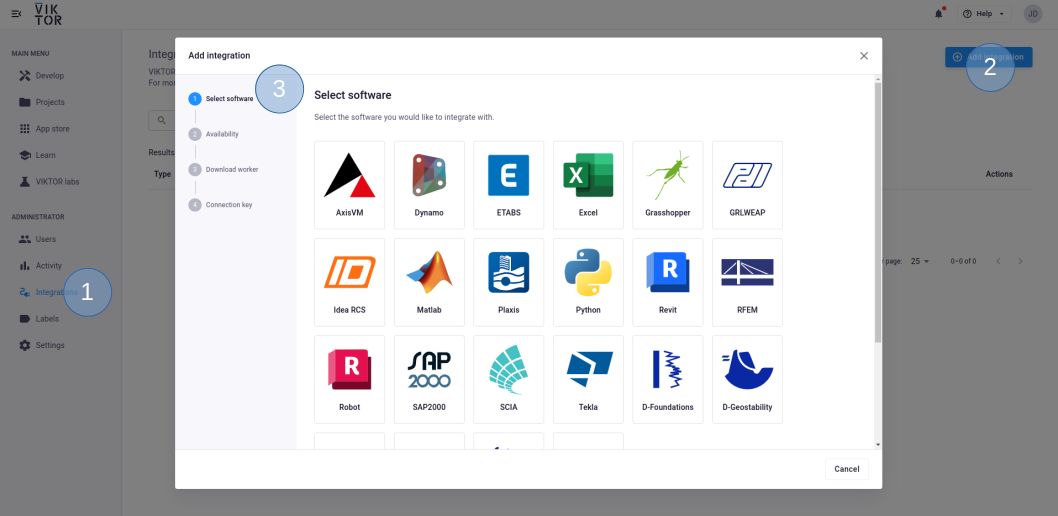
3.1. Select ETABS
3.2. Select the workspace(s) the integration should be available to
3.3. Download the worker .msi (Microsoft Installer) and run it on the machine of choice
3.4. Copy the generated connection key and paste it when the installer asks for it. In the browser, you can now click Finish and continue in the installer.
Connection KeyThe generated connection key should be copied immediately as VIKTOR will not preserve this data for security reasons.
-
Make sure to launch the integration once the installation is finished. If you closed the integration, you can restart it through the desktop shortcut.
Testing
vkt.etabs.connect and vkt.sap2000.connect need to be mocked within the
context of (automated) testing. The vkt.testing module provides the
mock_ETABSConnection and
mock_SAP2000Connection decorators, which map each Open API path to the
result it should return. The same two decorators also mock vkt.etabs.attach and vkt.sap2000.attach:
import unittest

import viktor as vkt

from app.my_entity_type.controller import MyEntityTypeController


class TestMyEntityTypeController(unittest.TestCase):
    @vkt.testing.mock_ETABSConnection(results={
        'FrameObj.AddByCoord': ['B1', 0],  # <OAPI path>: [*output_params, status]
        'FrameObj.GetPoints': ['P1', 'P2', 0],
    })
    def test_analysis(self):
        MyEntityTypeController().analysis()
Sending a Python script to the worker
Your app sends a Python script to the worker, which runs it against the CSI software through comtypes. This is
the only option for other CSI tools such as SAFE and CSiBridge, and remains supported for existing ETABS and
SAP2000 apps.
ETABS and SAP2000 each have a dedicated analysis class (vkt.etabs.ETABSAnalysis,
vkt.sap2000.SAP2000Analysis) and worker integration (etabs, sap2000). SAFE and CSiBridge have
neither — use the generic viktor.external.python.PythonAnalysis class and the python
worker integration instead; see the SAFE/CSiBridge notes below, and App code for the
class itself.
Add integration to app config
To make the worker integration available through the interface, add the following to your viktor.config.toml:
worker_integrations = [
    "etabs",
    "sap2000",
]
Neither has its own worker integration — register the 'python' worker instead:
worker_integrations = [
    "python",
]
Install the worker
This worker runs your Python script, so its setup includes selecting the Python environment it should use.
For SAP2000, follow the same steps, but select SAP2000 instead of ETABS (Legacy). For SAFE or CSiBridge, select the Python integration instead — see below.
Follow these steps to install the worker:
- Personal worker
- Organization worker
A personal worker connects the software that is installed on your own machine, for your own use. Personal workers are installed and managed with VIKTOR Desktop:
-
Download and install VIKTOR Desktop and log in with your VIKTOR account, if you haven't done so already
-
In VIKTOR Desktop, click "Add" and select ETABS (Legacy)
-
Select the Python environment of your choice by setting the path to its
python.exeas the executable path. This can be your system Python, or the python.exe in a dedicated virtual environmenttipYour default Python environment can usually be found in
C:\Users\Username\AppData\Local\Programs\Python\Python31X\python.exeIf you cannot find it, try running the following command in your terminal
where python -
Start the worker. You can view its logs inside VIKTOR Desktop, and the editor shows when your worker is online
Personal workers that were installed with the previous per-worker installer keep running, but new personal workers can only be added through VIKTOR Desktop: the per-worker installer download and connection-key flow are no longer available for personal use.
An organization worker connects software that runs on a machine managed by your organization, such as a virtual or remote machine, and is shared by the users of the app instance(s) you select.
You need to be an environment administrator in order to install an organization worker.
-
Navigate to the "Integrations" tab in the Administrator panel
-
Click "Add integration"
-
Follow the steps provided in the modal
3.1. Select ETABS (Legacy)
3.2. Select the app instance(s) the integration should be available to
3.3. Download the worker .msi (Microsoft Installer) and run it on the machine of choice
3.4. Copy the generated connection key and paste it when the installer asks for it. In the browser, you can now click Finish and continue in the installer.
Connection KeyThe generated connection key should be copied immediately as VIKTOR will not preserve this data for security reasons.
-
In the installer wizard, select the Python executable of your choice, this can be your system Python, or the python.exe in a dedicated virtual environment
tipYour default Python environment can usually be found in
C:\Users\<Username>\AppData\Local\Programs\Python\Python31X\python.exe.If you cannot find it, try running
where pythonin your terminal. -
Make sure to launch the integration once the installation is finished. If you closed the integration, you can restart it through the desktop shortcut.
Follow the same steps, but select the Python integration in step 2 (or 3.1 for an organization
worker), matching the python worker integration configured above.
Install Python dependencies
The etabs and sap2000 workers control the CSI software through a Python environment where pywin32 and comtypes need to be installed. This environment can be on
your local Windows machine or a remote server where the CSI software is installed with a valid license.
- Install the necessary libraries (
pywin32andcomtypes) usingpipin the python environment selected during worker setup (in VIKTOR Desktop, the Python environment is the one whosepython.exeyou set as the executable path):
pip install pywin32 comtypes
App code
The following directory structure can be used as a template when working with the ETABS and SAP2000 API:
my-etabs-app/
├── app.py
├── run_etabs_model.py
├── inputs.json
This is the role of each file:
-
The
app.pycontains the logic of your VIKTOR app. It will use theinputs.jsonfile as input for the worker and reads theoutput.jsongenerated by the worker. -
The worker executes the
run_etabs_model.pyusing the Python environment defined during worker installation (also defined in theconfig.yaml). This file will generateoutput.jsonwhich is send back to the VIKTOR app.
You can use the following app.py template to set up the communication with your worker:
# app.py
import viktor as vkt
from pathlib import Path

class Parametrization(vkt.Parametrization):
    ...

class Controller(vkt.Controller):
    ...
	# A function inside the Controller creates the `inputs.json`.

    def run_etabs(self, params, **kwargs):
        script = vkt.File.from_path(Path(__file__).parent / "run_etabs_model.py")
        files = [("inputs.json", vkt.File.from_path(Path(__file__).parent / "inputs.json"))]
        analysis = vkt.etabs.ETABSAnalysis(
            script=script, files=files, output_filenames=["output.json"]
        )
        analysis.execute(timeout=300)
        output_file = analysis.get_output_file("output.json")
For SAP2000, use vkt.sap2000.SAP2000Analysis instead of vkt.etabs.ETABSAnalysis; the rest of the template is
the same.
Neither has a dedicated analysis class. Import the generic
PythonAnalysis instead and use it directly:
from viktor.external.python import PythonAnalysis

analysis = PythonAnalysis(
    script=script, files=files, output_filenames=["output.json"]
)
The rest of the template — building inputs.json, driving the CSI COM API through comtypes on the
worker, writing output.json — is unchanged. Only the program path and COM identifiers differ per
product; check the CSI help file installed with SAFE or CSiBridge for its own.
The following template can be used to define the content of your run_etabs_model.py to communicate with the worker and your VIKTOR app:
# run_etabs_model.py
import json
from pathlib import Path

def create_etabs_model():

    '''
    1. Your code reads the inputs.json file and
    uses the content for structural analysis in ETABS.
    '''
    input_json = Path.cwd() / "inputs.json"
    with open(input_json) as jsonfile:
        data = json.load(jsonfile)

    '''
    2. Add your logic here for the analysis
    using the ETABS API.
    '''

    '''
    3. Store the results of your analysis
    in the output.json file to be sent to
    your VIKTOR app.
    '''
    output = Path.cwd() / "output.json"
    with open(output, "w") as jsonfile:
        json.dump(outputs, jsonfile)

create_etabs_model()
You can check the following tutorial to see the worker in action!
Testing
ETABSAnalysis.execute and SAP2000Analysis.execute need to be
mocked within the context of (automated) testing.
The viktor.testing module provides the mock_ETABSAnalysis and
mock_SAP2000Analysis decorators that facilitate mocking of workers.
For SAFE or CSiBridge, mock the underlying mock_PythonAnalysis
decorator instead:
import unittest

import viktor as vkt

from viktor.testing import mock_ETABSAnalysis

from app.my_entity_type.controller import MyEntityTypeController


class TestMyEntityTypeController(unittest.TestCase):
    @mock_ETABSAnalysis(get_output_file={
        'result.xml': vkt.File.from_path('test_file.xml'),  # <name>: <File>
        'result.json': vkt.File.from_path('test_file.json'),
        ...
    })
    def test_analysis(self):
        MyEntityTypeController().analysis()
For the decorator's input parameters the following holds:
- If a Sequence type is provided, the next entry is returned for each corresponding method call. When a call is performed on a depleted iterable, an Exception is raised.
- If a single object is provided, the object is returned each time the corresponding method is called (endlessly).
- If None is provided (default), a default File/BytesIO object (with empty content) is returned each time the corresponding method is called (endlessly).