How is VIKTOR organized?
In this page, we explain how you can build, share, connect and use apps with VIKTOR.
Build apps
VIKTOR is built around the core idea of creating apps by defining what you want to automate. With VIKTOR, you can automate engineering workflows and turn ideas into working applications in minutes.
You have two ways to build apps: the App Builder generates and runs your code in the browser with no setup, while local development lets you write code in your own IDE for more complex apps. See Two ways to build a VIKTOR app for a side-by-side comparison.
Connect apps
VIKTOR connects directly to the software you already use, such as Excel and any engineering applications from Autodesk, Bentley and Trimble, and much more by means of integrations. This means no more exporting, copying, and re-importing data between different tools and software. Instead, you can make everything work together in one connected and centralized workflow.
As a result, your work becomes easier to manage, changes are applied more consistently, and you reduce errors caused by manual steps.
What this means in practice:
- Works with your engineering tools: Connects to the software and data you already use
- Reduces manual work: No more copying and pasting between systems
- Everything in one flow: Your data stays connected throughout the entire process
- Fewer errors: Less risk of mistakes from manual transfers
Share apps
Once your app is ready, you can easily share it with your team. They can use it without having to understand the underlying logic.
VIKTOR takes care of things like data storage, access rights, and updates in the background, so you don't have to worry about it. When you update your app, everyone automatically works with the latest updated version, making it easy to scale knowledge and solutions across your team and projects.
What this means in practice:
- Easy to share: Let others use your app (without exposing the logic behind it)
- Always up to date: Improvements are automatically available to everyone
- Controlled access: Decide who can use each app (specific users or your whole environment)
Use apps
To use an app in VIKTOR, you add it to a project. Once added, the app gets its own version within that project, with its own data.
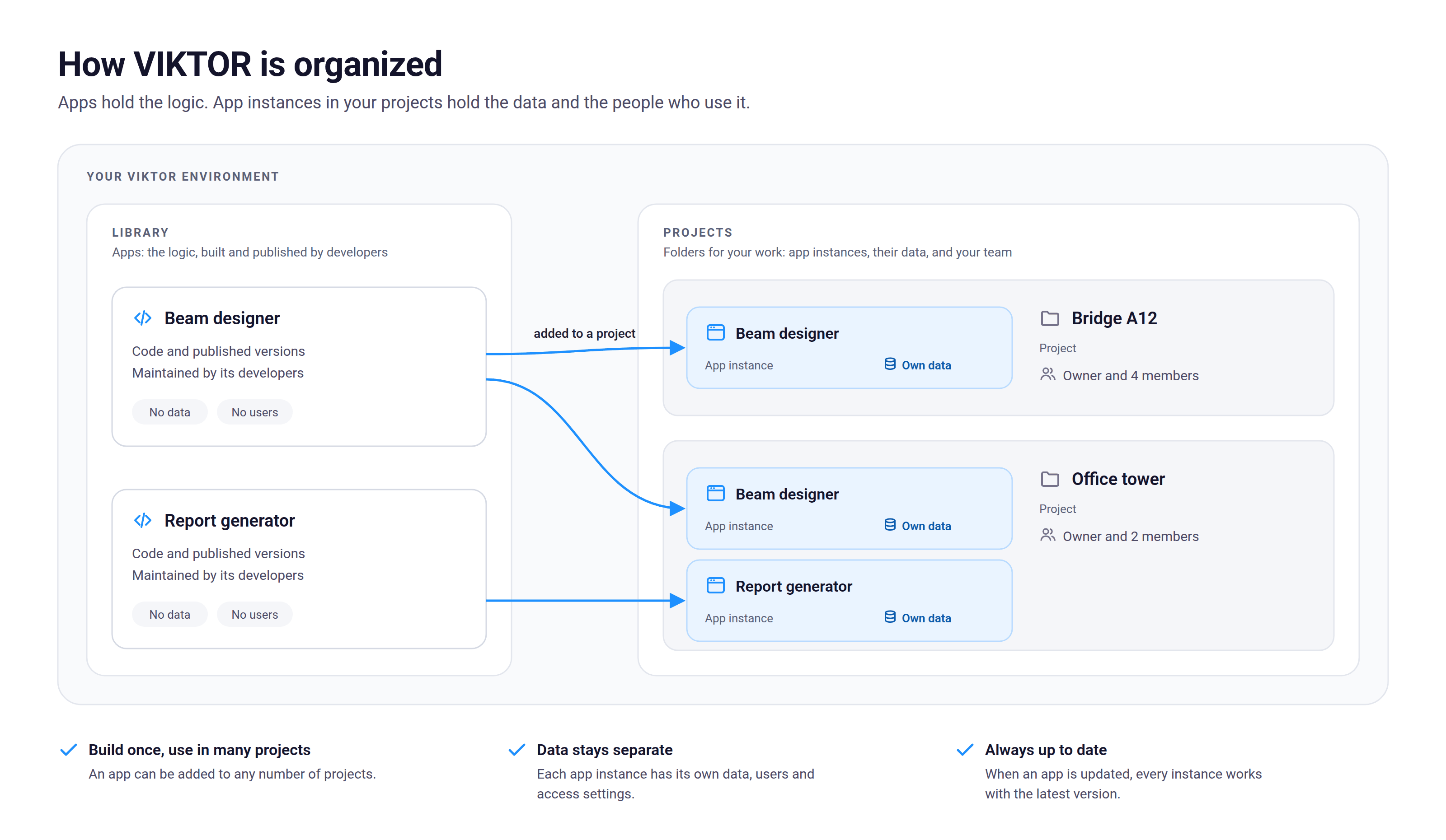 Apps in the Library hold the logic. App instances in your projects hold the data and the people who use it.
What is a project?
Think of a project like a folder for your work. Just like you would create a folder in SharePoint and add files to it, a VIKTOR project contains everything you need for a specific job to be done:
- Your apps
- Your data
- Your team
Each project is separate, so everything stays organized and relevant to that specific project.
How apps work inside a project
When you add an app to a project, you create a separate instance of that app.That means the app is copied, so the data is unique to that project. So, if you use the same app in two different projects, they won’t affect each other.
Why is this useful?
This setup helps you keep control and stay organized:
- Keep data separate: Each project has its own data, even if you use the same app elsewhere
- Reuse apps easily: Build an app once and use it across multiple projects
- Control who sees what: Decide which users or teams can access each project and its data