AutoCAD
This guide explains how to integrate AutoCAD with a VIKTOR app. Your app calls the AutoCAD ActiveX Automation API directly, so you can draw parametric geometry into a drawing, read an existing drawing, and annotate it, all from your app code.
vkt.autocad.connect() and vkt.autocad.attach() are a BETA feature and require
viktor >= 14.35.0.
vkt.autocad.connect() starts an AutoCAD instance on the worker for the session.
vkt.autocad.attach() binds the session to the instance the user already has open instead of
starting a new one; see Attaching to a running instance.
The worker
A worker is a program that connects the VIKTOR platform to third-party software running outside the platform. For AutoCAD it belongs on the machine where you use AutoCAD, as a personal worker: AutoCAD must be installed where the worker is, and a session drives the real desktop application. Your VIKTOR app handles the communication between the web app and the worker.
Here is what happens during the integration:
- The user performs an action that requires an AutoCAD analysis.
- Your app opens a session, and each ActiveX call it makes is sent to the worker as a task.
- The worker executes that one call against the live AutoCAD instance and returns its result.
- Your app uses the returned values to build its views, or draws the next piece of geometry.
- (Optional) VIKTOR UI displays the result.
Unlike the integrations that send a file or a script to the worker, there is no drawing script to write and ship: all of your code stays in your app, and the worker machine needs no Python environment.
The worker drives the real desktop application, so the machine it runs on needs a logged-in, interactive Windows session (a service running in Session 0 cannot start AutoCAD). The licence must not prompt on startup either: nobody is there to answer an Autodesk sign-in or activation dialog, so the app would only see a timeout. Activate the licence once by launching AutoCAD by hand on that machine, as the same user the worker runs as.
Calling the API directly from your app
Open a session with vkt.autocad.connect() and navigate the AutoCAD object model from the acad
object it gives you:
import viktor as vkt


class Controller(vkt.Controller):
    parametrization = Parametrization

    def draw_in_autocad(self, params, **kwargs):
        with vkt.autocad.connect(timeout=60) as acad:
            document = acad.ActiveDocument
            model_space = document.ModelSpace

            line = model_space.AddLine([0, 0, 0], [params.span, 0, 0])
            line.Layer = "STRUCTURE"          # property write: plain assignment
            length = line.Length()            # property read: call syntax (note the parentheses)

            document.Regen(vkt.autocad.AcRegenType.acAllViewports)
Please consider the following:
- A property is read with parentheses and written without them.
line.Length()gives you the value;line.Layer = "STRUCTURE"sets it. This is the convention that catches people out most often, so it is worth checking first when a call behaves unexpectedly. - Objects that calls return are session-scoped handles. Use them as the start of further calls
and as arguments, exactly like the COM objects they stand for. They are released when the session
closes, so read the values you need before the
withblock ends. - Navigate down from
acad. The back-referencesApplication,DocumentandParentare refused, so keep your own reference toacad.ActiveDocumentinstead of walking back up. - Every call is a round trip to the worker; navigating attributes to reach it is free.
acad.ActiveDocument.ModelSpace.AddLine(...)is one round trip, not three. Bound loops that call or read properties per entity, and prefer the ActiveX calls that work in bulk over a loop that touches every entity of a large drawing. - Filenames are confined to the session's working directory. Give
SaveAs,Import,Export,PlotToFileandInsertBlocka relative filename rather than an absolute path. In this release a drawing cannot be returned from the session to your app, so read the values you need through ActiveX while the session is open. - Some members are refused by the worker and raise
vkt.ExecutionError: those that execute arbitrary code (SendCommand,RunMacro,LoadArx), those that wait for input at the command line (Utility.GetPointand the other promptingGet*,Prompt,SelectOnScreen), those that change settings outliving the session (Preferences,SetVariable), andSave,CloseandQuit. Save withSaveAsand a relative filename instead. - The enumerations live on
vkt.autocad, and their member names mirror ActiveX exactly:vkt.autocad.AcRegenType.acAllViewports.from viktor.external.autocad import AcRegenTypegives you the same object under a shorter name. Note that they are not on the top-levelvktnamespace, sovkt.AcRegenTyperaisesAttributeError.
The ActiveX members you call on acad mirror the AutoCAD Object Model and are not listed in the SDK
reference. Look them up in the
AutoCAD ActiveX Reference Guide,
or in the acadauto.chm help file in your AutoCAD installation.
Attaching to a running instance
vkt.autocad.attach() opens the same kind of session against the AutoCAD that is already running
on the worker machine, rather than starting a fresh instance. The app then reads and writes the
drawing the user has on screen, and what it draws appears in their window. This is what you want when
the point is to act on the drawing in front of the user, which in practice means a personal worker on
their own machine.
def draw_in_autocad(self, params, **kwargs):
    try:
        with vkt.autocad.attach(timeout=120) as acad:
            self.draw(acad, params)
    except vkt.WorkerSessionAttachError as err:
        if err.reason == "error_attach_no_instance":
            raise vkt.UserError(
                "No AutoCAD instance was found on your worker. Open your drawing in AutoCAD on the "
                "machine running your personal worker, then try again."
            ) from err
        raise vkt.UserError(f"Could not attach to AutoCAD ({err.reason or 'unknown reason'}).") from err
The two are strictly separate:
attach()fails when nothing is running on the worker machine; it never starts AutoCAD for you.connect()always starts a fresh instance. If AutoCAD is already open on the worker machine the session is refused — close it there, or useattach().- There is no automatic fallback in either direction. If you want one, write it yourself by catching
vkt.WorkerSessionAttachErrorand callingconnect().
What changes once the session is attached:
- The drawing is not empty. Do not assume the model space is blank, that layer names are free, or that the coordinate system is at its defaults.
- Closing the session detaches without exiting AutoCAD. The instance and the drawing stay as they were, including everything your app drew.
- Nothing rolls back. Your app's changes are real edits in the user's drawing, and undoing them is their call. Draw onto layers with a recognisable prefix so the result is easy to isolate.
- The user's file on disk is still never overwritten:
Saveis refused, andSaveAswrites into the session's working directory.
An attached session produces edits in the drawing already open on the user's screen — they watch the
geometry appear, and saving the file is theirs to do. A DownloadButton promises a file that is
never coming, and a save dialog is not what anyone expects after editing a model in front of them.
Use a vkt.ActionButton when your app only draws, and a
vkt.SetParamsButton when it also writes values back
into the parametrization. Keep DownloadButton for output your app builds itself, such as a report
or a CSV of values read through ActiveX.
vkt.errors.WorkerSessionAttachError carries a reason:
"error_attach_no_instance" when nothing is running on the worker machine, and "error_attach_refused"
when an instance was found but would not accept the connection, typically because it is busy or
waiting on a dialog. Others come from the worker connection itself rather than AutoCAD — for example
"no_worker_online" (no worker is connected) and "worker_kind_not_allowed" (this worker kind is
disabled for the organization) are usually the first ones a user hits; see the reference page for the
full set of eight. Handle an unrecognised reason as a generic attach failure. Note that
WorkerSessionAttachError is a subclass of vkt.WorkerSessionError, so catch it first if you handle
both.
Add integration to app config
To make the worker integration available through the interface, add the following to your viktor.config.toml:
worker_integrations = [
    "autocad",
]
Install the worker
Install an AutoCAD worker as a personal worker, on the machine where you use AutoCAD. It calls the AutoCAD API directly, so it needs no Python environment.
A personal worker connects the software that is installed on your own machine, for your own use. Personal workers are installed and managed with VIKTOR Desktop:
-
Download and install VIKTOR Desktop and log in with your VIKTOR account, if you haven't done so already
-
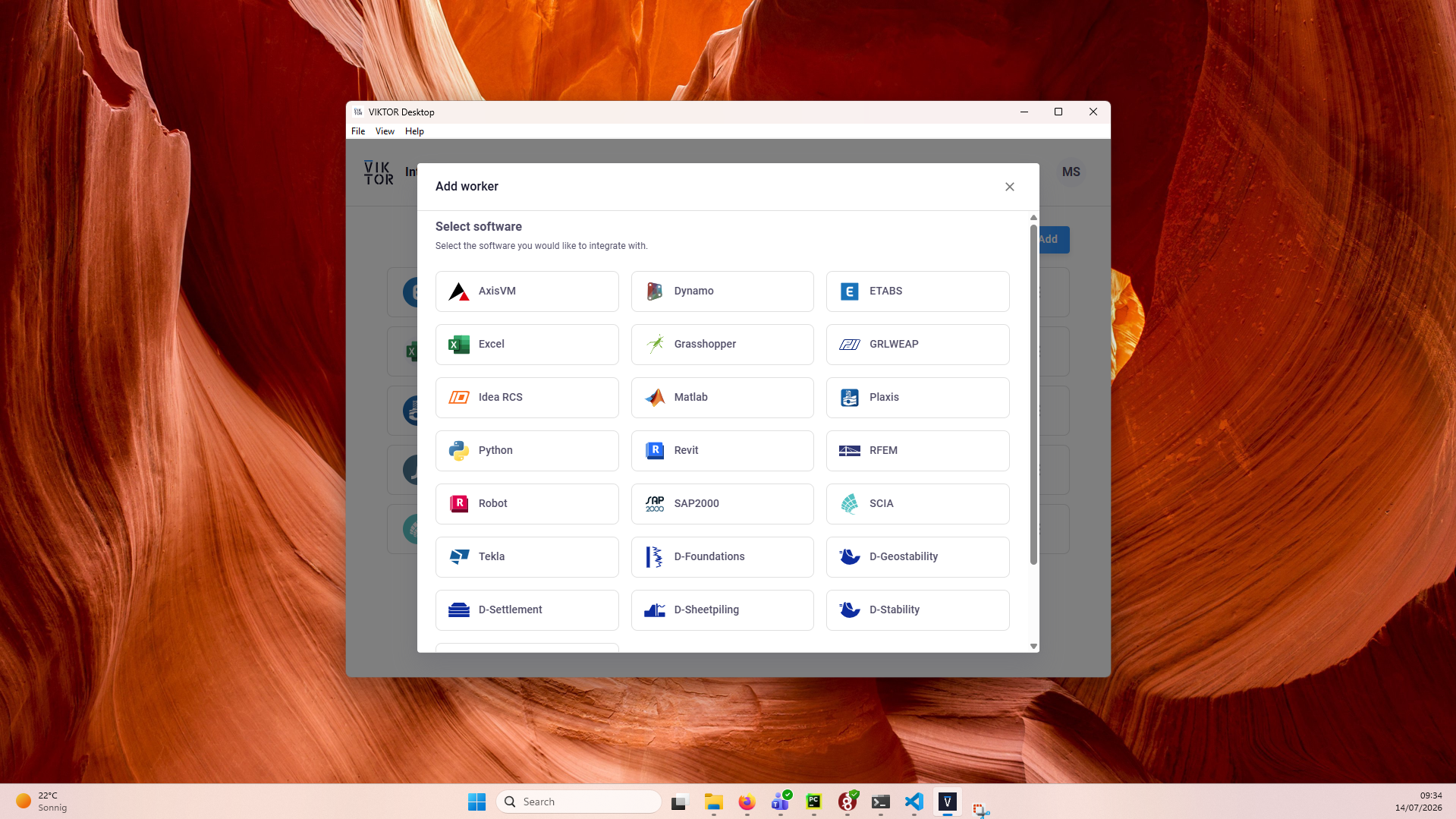
In VIKTOR Desktop, click "Add" and select AutoCAD
-
Start the worker. You can view its logs inside VIKTOR Desktop, and the editor shows when your worker is online
Personal workers that were installed with the previous per-worker installer keep running, but new personal workers can only be added through VIKTOR Desktop: the per-worker installer download and connection-key flow are no longer available for personal use.
An organization worker shares one machine between the users of a workspace, which does not suit AutoCAD. The session drives the real desktop application, so every concurrent user needs their own interactive Windows session and their own licence, and attaching to "the instance already running" on a shared machine would reach whatever drawing the previous job left open.
To offer AutoCAD capability across your organization instead of per user, use Autodesk Platform Services and its Design Automation API, which runs AutoCAD workloads in Autodesk's cloud with no worker and no local install.
Testing
vkt.autocad.connect needs to be mocked within the context
of (automated) testing. The vkt.testing module provides the
mock_AutoCADConnection decorator, which maps each
ActiveX path to the result it should return. The same decorator also mocks vkt.autocad.attach:
import unittest

import viktor as vkt

from app.my_entity_type.controller import MyEntityTypeController


class TestMyEntityTypeController(unittest.TestCase):
    @vkt.testing.mock_AutoCADConnection(results={
        # a result shaped {"__handle__": n} is decoded into an object handle, as in production
        'ActiveDocument.ModelSpace.AddLine': [{"__handle__": 1}],
        'Length': [6.0],
    })
    def test_draw_in_autocad(self):
        MyEntityTypeController().draw_in_autocad()
Paths that are not in the dictionary return None. For a result that depends on the call, pass a
function of the ActiveX path and its arguments instead of a dictionary.
Troubleshooting the worker installation
How the worker finds the application
The autocad and civil3d worker kinds both use AutoCAD's automation
registration, AutoCAD.Application. Civil 3D has no separate registration: it is AutoCAD started
with Civil 3D's product switches, so both kinds start and connect to the same acad.exe. That shared
registration is why an installation problem on either product can surface in the other.
At worker start, the worker checks that this registration points to an installed executable. If the
version-independent entry is stale, the worker falls back to the newest versioned entry, such as
AutoCAD.Application.26, and logs a warning. If no entry points to an installed executable, the kind
refuses to start and asks you to install or repair the product.
Installation conflicts
Every AutoCAD-family product registers two entries: a versioned one per release, such as
AutoCAD.Application.26 for the 2027 release, and the shared version-independent
AutoCAD.Application. The shared entry is owned by whichever installer wrote it last, and
uninstallers do not always clean it up. This is what can leave it stale or pointing at the wrong
product:
- An older release was removed after a newer one was installed. The shared entry keeps pointing
at the removed release. The newer install registered its own versioned entry but did not rewrite
the shared one. Without the fallback this shows as "cannot find the file specified" on
connect()and "no running instance" onattach()while the product is visibly open. With the fallback the worker binds through the newest versioned entry and logs a warning. No action is needed, but repairing the installation cleans the entry up. - Several releases installed side by side. The worker starts the newest registered release. Install one AutoCAD-family release per worker machine, or make sure the newest one is the release you want to automate.
- Per-user registry overrides. Entries under the current user's classes take precedence over the machine-wide ones for a worker that runs without elevation. A leftover per-user entry can shadow a healthy machine-wide registration. Remove it, or repair the installation.
- No registration at all. A failed or trial installation may not register the automation server, and the worker refuses to start the kind.
In all cases the fix is on the machine, not in the worker. Repair the installation from Apps & Features, restart the worker, and check the worker log for the stale-registration warning.
Create mode
connect() starts a private instance for the session. Only one AutoCAD-family application can be
automated on a machine at a time, so create mode refuses to start while any AutoCAD or Civil 3D
window is already open on the worker machine. Close the open application, or use
attach mode to work with it. This also means create sessions on one worker run one at
a time.
Attach mode
attach() connects to the instance the engineer already has open. Keep exactly one instance open.
With several open, the worker reaches only the first one started and cannot pick another.
- Nothing open. The session fails with
reason"error_attach_no_instance". Open the drawing on the worker machine and retry. - Civil 3D open, AutoCAD requested. Accepted. Civil 3D exposes the full AutoCAD API, so the
autocadkind binds it happily — but remember the drawing is a Civil 3D drawing, and the app is reaching only its AutoCAD surface. To reach surfaces, alignments or COGO points, use thecivil3dkind instead. - Product started as administrator. An elevated instance is invisible to a worker that runs without elevation, and the session reports no running instance. Run the product and the worker as the same Windows user at the same elevation.
The worker never closes, hides, or saves the engineer's instance in attach mode.
The autocad kind has no release gate: any installed AutoCAD release that registers the automation
server can be automated. The civil3d kind does gate on the
release, and also on a units profile.
FAQs
Why does reading a property need parentheses?
Every attribute you touch on acad is forwarded to AutoCAD, and the connection cannot tell "give me
this value" from "give me this object to keep navigating" without the call. So a property is read
with call syntax, line.Length(), and written by plain assignment, line.Layer = "STRUCTURE". A
method is called the same way, which makes the rule simple in practice: anything you want a value
back from gets parentheses.
My app fails with "No AutoCAD instance was found on your worker"
That is vkt.WorkerSessionAttachError with reason "error_attach_no_instance":
vkt.autocad.attach() binds only to an AutoCAD that is already running, and never starts one. Open
the drawing in AutoCAD on the machine running the worker and try again, or use
vkt.autocad.connect() if the app does not need the user's own drawing.
Why are Save and SendCommand refused?
The worker refuses members that let a session reach outside itself. Save would overwrite the user's
file in place, so SaveAs with a relative filename is offered instead, which writes into the
session's working directory. SendCommand, RunMacro, LoadArx and Eval execute arbitrary code
on the worker machine. The object model covers essentially everything in the AutoCAD UI, so there is
a supported member for what you need.
Can I download the DWG my app drew?
Not in this release: no file can be returned from the session to the app, and the session's working
directory goes away with the session. Where the point is to produce drawn output, use
vkt.autocad.attach() so the geometry lands in the drawing the user has open and they save it
themselves. Where the point is a calculation, read the values you need through ActiveX while the
session is open and build your views from those.
How do I roll this out to everyone in my organization?
Not with an organization worker: it shares one machine between the users of a workspace, and each concurrent AutoCAD session needs its own interactive Windows session and licence. Give each engineer a personal worker if they each work in their own drawings.
If what you need is AutoCAD capability without a per-user install, that is a different integration:
Autodesk Platform Services offers a
Design Automation API
that runs AutoCAD workloads in Autodesk's cloud, reached from a VIKTOR app through an OAuth 2.0
integration rather than through vkt.autocad.
Every session times out and AutoCAD never appears
Check the two requirements in The worker before looking at your app code. The worker machine needs a logged-in, interactive Windows session, and AutoCAD must open straight to a drawing without an Autodesk sign-in or activation dialog. There is no way to check a licence up front, so a prompting licence surfaces only as a start-up failure.
My app is slow when it draws many entities
Every call, property read, or property write is one round trip to the worker; navigating attributes
to reach it is free. Two things usually account for slowness: per-entity property reads in a loop
that could be bounded or replaced with a SelectionSet filter, and per-entity work where a bulk
ActiveX call would do (AddLightWeightPolyline with a flat coordinate array, or Copy on a block
reference). Note also that about 65,000 object handles are available per session, so a job larger
than that has to be split across several sessions.