BoreDM
BoreDM is a cloud-based geotechnical data management platform that enables organizations to store, manage, and visualize borehole log data, lab test results, and geotechnical site investigation information. The VIKTOR integration allows you to access BoreDM project data, boring logs, lithology, samples, and lab results through the BoreDM REST API.
- You have access to a BoreDM account with API access
- You have a BoreDM API key (request one from boredm.com)
BoreDM API structure
This guide walks you through integrating BoreDM with VIKTOR, starting with provisioning an API key from your BoreDM account, securing it as an environment variable, and then using the BoreDM REST API to access your geotechnical data.
In this guide we will cover the following endpoints:
- Projects (
/api/v4/project/) - List and access BoreDM projects visible to your API key - Working with log data (
/api/v4/project/{project_id}/geojson) - Retrieve borehole locations and log IDs - Lithology (
/api/v4/logs/{project_id}/lithology) - Access soil layer descriptions, depths, and classifications - Samples (
/api/v4/logs/{project_id}/sample) - Retrieve SPT N-values, blow counts, sample depths, and recovery data - Specimens (
/api/v4/logs/{project_id}/specimen) - Access lab test results linked to field samples - Other tables (
/api/v4/logs/{project_id}/{table}) - Query generic/custom tables, teams, users, and project-level data
Getting a BoreDM API key
To use the BoreDM API, you need to provision an API key from your BoreDM account. Follow these steps:
- Navigate to Teams - In the BoreDM sidebar, click on Teams under the Resources section
- Open the Organization tab - Click on the Organization tab at the top of the page
- Provision a new API key - Select a user, enter a key name, and click + Provision new API key
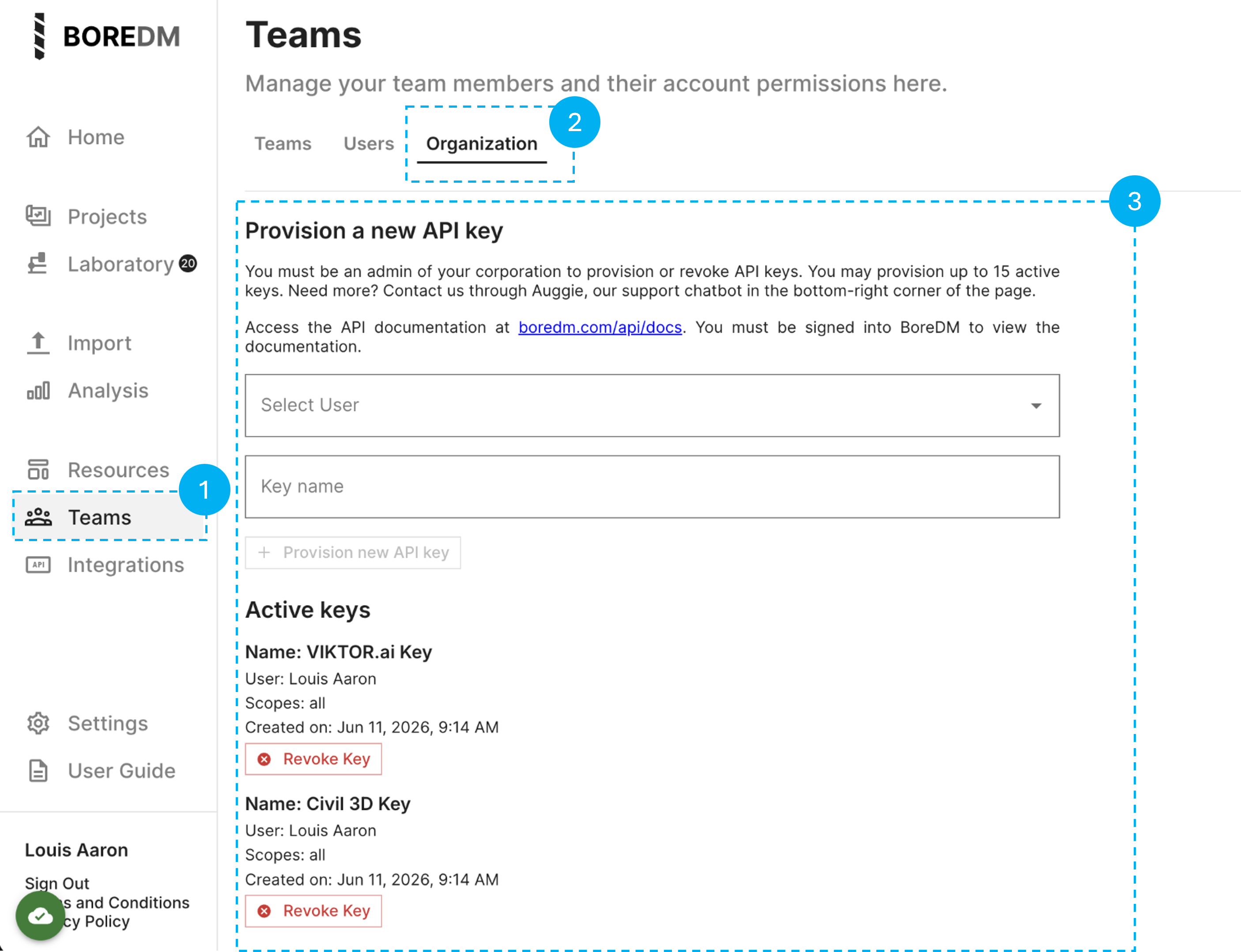
Environment variables and secrets
Once you have your BoreDM API key, you need to link it to your VIKTOR app. The API key should be stored as the environment variable BOREDM_API_KEY.
Whether you are working in the App Builder or in local development, follow the appropriate setup below. For more details on environment variables, see the App Builder environment variables guide or the local development environment variables guide.
- App Builder
- Local development
- Open the app in the App Builder.
- Click the gear icon in the bottom-left corner.
- Open the Variables tab.
- Add a variable named
BOREDM_API_KEY. - Mark it as secret when storing a real BoreDM API key.
- Read it in Python with
os.environ["BOREDM_API_KEY"]. - Use the same name in all snippets on this page.
import os

api_key = os.environ["BOREDM_API_KEY"]
- Set the environment variable when starting or running the app locally.
- Keep the real key out of committed files.
- Use the same variable name used in App Builder:
BOREDM_API_KEY.
viktor-cli start --env BOREDM_API_KEY=your-local-api-key
Then read it in Python:
import os

api_key = os.environ["BOREDM_API_KEY"]
Use a separate BoreDM key for local development when your organization has separate development and production access policies.
For more details on environment variables, see the App Builder environment variables guide or the local development environment variables guide.
Do not put the BoreDM API key in a VIKTOR field, browser-side JavaScript, Plotly figure metadata, or a printed log message.
Authentication
Every BoreDM request needs the same base URL and authorization header. This section defines the minimum request contract used by all code examples on this page.
- Base URL:
https://boredm.com - API version prefix:
/api/v4 - Required header:
Authorization: Secret <BOREDM_API_KEY> - Best practices:
- Store the API key in environment variables (see section above)
- Read it with
os.environ["BOREDM_API_KEY"] - Keep the key server-side in Python
- Never expose the key in browser-side JavaScript or client-visible code
BoreDM Projects
Project endpoints are the normal entry point for a VIKTOR integration because every log and table request needs a selected project ID.
Endpoint: GET /api/v4/project/
Use this endpoint to discover which BoreDM projects the current API key can read.
Use it to:
- List projects visible to the API key
- Fill a VIKTOR project selector
- Let users choose which project to inspect
The project list endpoint returns one item per project. Treat each project _id as the value you pass into later project-level endpoints. For user-facing labels, combine readable fields such as name, project_number, and client_name instead of exposing only the UUID.
- Important: Use project
_idasproject_id- do not use project name as the identifier for later endpoints
Common project fields:
_idnameproject_number
client_namestatusdate_created
date_updatednda_strict
Expand to see all available response fields
In alphabetical order:
_idaccessorsanalyte_settings_idautomated_notes_idbranding_idclient_namecommentsconsultant_project_numbercorporation_idcounty_codedate_createddate_updateddistrictdropdowns_id
facility_idfield_workflow_idfrom_uploadlibrary_idlocationlocation_idmapping_rulesmapping_rules_idn_value_idnamenda_strictproject_managerproject_numberproject_owner_logo
project_owner_nameproject_typeregionsampling_configurationssitemap_configurationspell_check_idstatusstratigraphic_unit_definitionstemplate_configurationunit_idvisual_description_configvisual_description_config_idwatermark_mapping_id
Example response:
[
  {
    "_id": "550e8400-e29b-41d4-a716-446655440000",
    "name": "Downtown Bridge Project",
    "project_number": "2024-001",
    "client_name": "City Engineering",
    "status": ["Active"],
    "date_created": "2024-01-15T14:30:00Z",
    "date_updated": "2024-01-15T14:30:00Z",
    "corporation_id": "550e8400-e29b-41d4-a716-446655440000",
    "nda_strict": true
  }
]
BoreDM data endpoints
Use the tabs below to explore each data type:
- GeoJSON
- Lithology
- Samples
- Specimens
- Other tables
What the GeoJSON endpoint does
Endpoint: GET /api/v4/project/{project_id}/geojson
This endpoint returns a GeoJSON feature collection where each feature represents one borehole. The critical field is feature.properties.id, which serves as the log_id for joining lithology, sample, and specimen records.
Important: Always use feature.properties.id as the log ID, never the boring name string.
Common GeoJSON fields:
feature.properties.id- Unique log ID (use this for joins)feature.properties.name- Boring namefeature.properties.boringType- Type of boring
feature.properties.status- Current statusfeature.geometry.coordinates- [longitude, latitude] array
Expand to see all available response fields
In alphabetical order:
featuresfeatures.geometryfeatures.geometry.coordinatesfeatures.geometry.type
features.propertiesfeatures.properties.boringTypefeatures.properties.depthfeatures.properties.id
features.properties.namefeatures.properties.statusfeatures.typetype
Example response:
{
  "type": "FeatureCollection",
  "features": [
    {
      "type": "Feature",
      "geometry": {
        "type": "Point",
        "coordinates": [-77.0369, 38.9072]
      },
      "properties": {
        "id": "550e8400-e29b-41d4-a716-446655440000",
        "name": "B-1",
        "boringType": "Boring",
        "depth": 50.0,
        "status": "Complete"
      }
    }
  ]
}
Endpoint: GET /api/v4/logs/{project_id}/lithology
The lithology endpoint returns soil and rock layer descriptions with depth intervals.
Use this endpoint to:
- Access layer descriptions and classifications
- Retrieve depth intervals for each soil/rock stratum
- Get USCS codes, colors, moisture content, and other classification data
Common lithology fields:
_id- Unique layer IDlog_id- Links to GeoJSON log IDstart_depth,end_depth- Depth intervalcomplete_description- Full layer description
uscs_code- USCS soil classificationsoil_type_1- Primary soil typecolor,moisture- Visual/physical properties
Expand to see all available response fields
In alphabetical order:
_idaashtoaashto_group_indexadditional_descriptionadditional_group_nameangularityangularity_2angularity_3angularity_4background_colorbouldersboulders_angularityboulders_hardnessboulders_shapecementationcobblescobbles_angularitycobbles_hardnesscobbles_shapecolorcolor_2complete_descriptioncustom_classificationdilatancydiscolorationdiscontinuity_descriptiondontautocompletedry_strengthend_depthfillforeground_color
fracture_spacingfrozengeological_unitgrain_sizegrain_size_2grain_size_3grain_size_4graphicgraphic_1_lengthgraphic_2graphic_2_lengthhardnesshcl_reactionice_classificationidentifieris_field_rowis_rockline_typelog_idmicaceousmode_of_depositionmoisturemunsell_colorodorplasticityprimary_constituentprimary_constituent_angularityprimary_constituent_grain_sizeprimary_constituent_quantityrock_typerock_type_2
secondary_constituentsecondary_constituent_angularitysecondary_constituent_grain_sizesecondary_constituent_quantitysheensoil_consistencysoil_rock_equivalentsoil_type_1soil_type_2soil_type_3soil_type_4soil_type_quantity_1soil_type_quantity_2soil_type_quantity_3soil_type_quantity_4stainingstart_depthstratificationstratigraphic_unitstrengthstrength_2structuretoughnesstransition_lengthtype_2_modifiertype_modifieruscs_codeusdaweathering
Example response:
[
  {
    "_id": "fa3b1d9b-8d07-4f02-b1fe-1b031a8d344a",
    "log_id": "c9acc7c3-4313-4d6f-883d-9c9bf2b207ff",
    "start_depth": 0.0,
    "end_depth": 15.0,
    "complete_description": "Sandy CLAY, brown, moist, medium stiff (<i>CL</i>)",
    "uscs_code": "CL",
    "soil_type_1": "Clay",
    "color": "Brown",
    "moisture": "Moist",
    "is_field_row": false
  }
]
Endpoint: GET /api/v4/logs/{project_id}/sample
The samples endpoint returns field sample data including SPT N-values, blow counts, sample types, and recovery.
Use this endpoint to:
- Retrieve SPT N-values for geotechnical analysis
- Access blow count data (blows_1, blows_2, blows_3)
- Get sample depths and types
- Retrieve RQD and core recovery for rock samples
Common sample fields:
_id- Unique sample IDlog_id- Links to GeoJSON log IDstart_depth- Sample depth
n_value,corrected_n_value- SPT valuesblows_1,blows_2,blows_3- Individual blow counts
sample_type- Sample classificationpercent_rqd,percent_core_recovery- Rock data
Expand to see all available response fields
In alphabetical order:
_idblows_1blows_2blows_3blows_4blows_5blows_6core_recovery_lengthcorrected_n_valuedepth_driven_1depth_driven_2depth_driven_3depth_driven_4depth_driven_5
depth_driven_6diameterfield_sample_idhydraulic_pressureis_field_rowlengthlog_idn_160n_60n_valuepercent_core_recoverypercent_recoverypercent_rqdphoto_urls
recovery_lengthrefusalrqd_core_lengthsample_commentsample_typesampler_correction_factorsampler_graphicsolid_core_recovery_lengthsolid_core_recovery_percentstart_depthtime_sampleduncorrected_n_valuewoh_worworkflow_status
Example response:
[
  {
    "_id": "290b70c4-2027-453f-a7fb-c8ab1990440c",
    "log_id": "c9acc7c3-4313-4d6f-883d-9c9bf2b207ff",
    "start_depth": 18.0,
    "blows_1": 3,
    "blows_2": 4,
    "blows_3": 6,
    "n_value": "10",
    "sample_type": "SPT",
    "length": 1.5,
    "recovery_length": 13.0,
    "is_field_row": false
  }
]
Endpoint: GET /api/v4/logs/{project_id}/specimen
The specimens endpoint returns lab test results and specimen-level data.
Use this endpoint to:
- Access lab test results (strength, unit weight, etc.)
- Retrieve environmental test data (CAS fields)
- Link lab specimens back to field samples
Common specimen fields:
_id- Unique specimen IDlog_id- Links to GeoJSON log IDsample_id- Links to sample recordstart_depth,end_depth- Test depth range
direct_shear_peak_friction_angle- Shear strengthdirect_shear_peak_cohesion- Cohesiondry_unit_weight,wet_unit_weight- Unit weights
Important: Specimens typically join to samples via specimen.sample_id = sample._id, but always verify the join key structure for your specific account.
Expand to see all available response fields
In alphabetical order:
_idaashtoaashto_group_indexadditional_descriptionadditional_group_nameangularityangularity_2angularity_3angularity_4atterberg_llatterberg_piatterberg_plbouldersboulders_angularityboulders_hardnessboulders_shapecalcium_carbonate_equivalentcas_cbrcementationcerchar_abrasivitychloridecobblescobbles_angularitycobbles_hardnesscobbles_shapecoefficient_of_consolidationcohesioncolorcolor_2commentcomplete_descriptioncompression_indexcompressive_strengthconfining_pressurecore_conditioncustom_classificationd_10d_60direct_shear_peak_cohesiondirect_shear_peak_friction_angledirect_shear_peak_tangent_anglediscolorationdry_densitydry_strengthdry_unit_weighteffective_cohesioneffective_friction_angleelastic_modulusend_depthexpansive_indexfidfield_percent_finesfield_percent_gravelfield_percent_sandfillfracture_spacingfriction_anglefrost_classificationfrozengeological_unitgrain_sizegrain_size_2grain_size_3grain_size_4hardnesshcl_reactionhexanehydraulic_conductivityice_classificationidentifier
in_situ_dry_densityin_situ_moisture_classificationin_situ_moisture_contentis_environmental_specimenis_field_rowis_lab_specimenis_rockisobutylenelab_aashtolab_aashto_group_indexlab_noteslab_percent_finelab_percent_gravellab_percent_sandlab_pocket_penetrometerlab_primary_constituentlab_sample_idlab_secondary_constituentlab_soil_type_1lab_soil_type_2lab_soil_type_3lab_soil_type_quantity_2lab_soil_type_quantity_3lab_torvanelab_uscs_codelab_vane_shearlab_vane_shear_remoldedlinear_shrinkageload_stresslog_idmax_dry_densitymethanemode_of_depositionmodifiermoisturemoisture_contentmunsell_colornameodoroptimum_moisture_contentover_consolidation_ratiooxidation_reduction_potentialp_hpct_finer_02mmpercent_boulderspercent_claypercent_coarse_gravelpercent_coarse_sandpercent_cobblespercent_fine_gravelpercent_fine_sandpercent_medium_sandpercent_organic_materialpercent_passing_200percent_passing_3_4percent_passing_4percent_passing_40percent_retained_on_10percent_retained_on_4percent_saturationpercent_siltpermeabilitypidplasticityplus_number_4plus_number_40pocket_penetrometerpoint_load_testpreconsolidation_pressureprimary_constituent
primary_constituent_angularityprimary_constituent_grain_sizeprimary_constituent_quantityqtr_valuerecompression_indexredox_potentialresistivityrock_typerock_type_2rock_workflow_statussalinitysample_idsample_id_strsample_temperaturesecondary_constituentsecondary_constituent_angularitysecondary_constituent_grain_sizesecondary_constituent_quantityshear_strengthsheenshrink_swell_load_stressshrink_swell_potentialshrinkage_limitslake_durabilityslurry_abrasivityso4soil_consistencysoil_rock_equivalentsoil_type_1soil_type_2soil_type_3soil_type_4soil_type_quantity_1soil_type_quantity_2soil_type_quantity_3soil_workflow_statusspecific_gravitystainingstart_depthstrainstratificationstratigraphic_unitstrengthstrength_test_typestructuresub_sample_idsulfatesulfidesswell_pressuretest_typestorvanetotal_dissolved_solidstoughnesstransition_lengthtx_uutype_2_modifiertype_modifierunconfined_compressive_strengthunit_weightuscs_codeusdavane_shearvane_shear_remoldedvisual_classificationvisual_moisturevoid_ratioweatheringwet_densitywet_unit_weight
Example response:
[
  {
    "_id": "dd6d6d84-8762-4317-b0e6-9a382dbb8bbd",
    "log_id": "c9acc7c3-4313-4d6f-883d-9c9bf2b207ff",
    "sample_id": "290b70c4-2027-453f-a7fb-c8ab1990440c",
    "start_depth": 18.0,
    "end_depth": 19.5,
    "atterberg_ll": 42,
    "atterberg_pl": 18,
    "atterberg_pi": 24,
    "moisture_content": 15.2,
    "dry_unit_weight": 105.3,
    "is_lab_specimen": true,
    "is_field_row": false
  }
]
Note: Specimen records may also include CAS number fields (e.g., cas_7440_02_0, cas_71_43_2) for environmental/chemical analysis data.
Generic and field tables
BoreDM can expose flexible table endpoints beyond the common lithology, sample, and specimen tables. These are useful for project-specific data like water levels, rock data, or custom field measurements.
Endpoint patterns:
- Office table:
GET /api/v4/logs/{project_id}/{table} - Field/mobile table:
GET /api/v4/logs/{project_id}/field/{table}
Example - querying water level data:
table_name = "water"

response = requests.get(
    f"https://boredm.com/api/v4/logs/{params.project_id}/{table_name}",
    headers={
        "Authorization": f"Secret {os.environ['BOREDM_API_KEY']}",
        "Accept": "application/json",
    },
    timeout=30,
)
response.raise_for_status()
rows = response.json()

preview = []
for row in rows[:20]:
    preview.append([
        row.get("_id"),
        row.get("log_id"),
        ", ".join(sorted(row.keys())[:8]),
    ])

return vkt.TableResult(preview, column_headers=["Row ID", "Log ID", "First keys"])
Other endpoints
Teams and users (account management):
GET /api/v4/team- List teamsPOST /api/v4/team- Create teamPOST /api/v4/team/{team_id}/users- Add users to teamDELETE /api/v4/team/{team_id}/users- Remove users from teamGET /api/v4/users/self- Get current user info
Project-level data (advanced dashboards):
GET /api/v4/project/{project_id}/labs- Lab test dataGET /api/v4/project/{project_id}/quality- Quality control dataGET /api/v4/project/full- Full project detailsGET /api/v4/log_graphics- Log graphics and images
Note: Lab rows may join through sample_id, but some accounts use display sample IDs or custom fields. Always inspect your data structure before implementing joins.
Implementation examples
The following implementation examples demonstrate complete, ready-to-use code for common BoreDM integration patterns in VIKTOR apps. Each example shows the full function or class definition you can copy into your app.py.
- Projects
- Log data
- Visualization
Create a project selector
Create an OptionField that lets users select a BoreDM project by combining the project name, number, and client name into a readable label.
import os
import requests
import viktor as vkt

def project_options(params, **kwargs) -> list[vkt.OptionListElement]:
    response = requests.get(
        "https://boredm.com/api/v4/project/",
        headers={
            "Authorization": f"Secret {os.environ['BOREDM_API_KEY']}",
            "Accept": "application/json",
        },
        timeout=30,
    )
    response.raise_for_status()
    projects = response.json()

    options = []
    for project in projects:
        project_id = project.get("_id")
        if not project_id:
            continue

        name = project.get("name") or "Unnamed project"
        number = project.get("project_number") or "No number"
        client = project.get("client_name") or "No client"
        label = f"{name} | {number} | {client}"

        options.append(vkt.OptionListElement(value=project_id, label=label[:90]))

    return options

class Parametrization(vkt.Parametrization):
    project_id = vkt.OptionField("Project", options=project_options)
Show projects in a TableView
Display all available projects in a table with their key information (ID, name, project number, client, and status).
@vkt.TableView("Projects", duration_guess=2)
def projects_table(self, params, **kwargs):
    response = requests.get(
        "https://boredm.com/api/v4/project/",
        headers={
            "Authorization": f"Secret {os.environ['BOREDM_API_KEY']}",
            "Accept": "application/json",
        },
        timeout=30,
    )
    response.raise_for_status()
    projects = response.json()

    rows = []
    for project in projects:
        rows.append([
            project.get("_id"),
            project.get("name"),
            project.get("project_number"),
            project.get("client_name"),
            ", ".join(project.get("status") or []),
        ])

    return vkt.TableResult(
        rows,
        column_headers=["Project ID", "Name", "Number", "Client", "Status"],
    )
Show lithology in a TableView
Display lithology layers with depth intervals, USCS codes, and soil descriptions for a selected project.
@vkt.TableView("Lithology rows", duration_guess=3)
def lithology_table(self, params, **kwargs):
    response = requests.get(
        f"https://boredm.com/api/v4/logs/{params.project_id}/lithology",
        headers={
            "Authorization": f"Secret {os.environ['BOREDM_API_KEY']}",
            "Accept": "application/json",
        },
        timeout=30,
    )
    response.raise_for_status()
    lithologies = response.json()

    rows = []
    for row in lithologies:
        rows.append([
            row.get("log_id"),
            row.get("start_depth"),
            row.get("end_depth"),
            row.get("uscs_code"),
            row.get("soil_type_1"),
            row.get("complete_description"),
        ])

    return vkt.TableResult(
        rows,
        column_headers=["Log ID", "Start", "End", "USCS", "Soil type", "Description"],
    )
Show samples in a TableView
Display sample data including SPT N-values, blow counts, and sample depths for a selected project.
@vkt.TableView("Sample rows", duration_guess=3)
def sample_table(self, params, **kwargs):
    response = requests.get(
        f"https://boredm.com/api/v4/logs/{params.project_id}/sample",
        headers={
            "Authorization": f"Secret {os.environ['BOREDM_API_KEY']}",
            "Accept": "application/json",
        },
        timeout=30,
    )
    response.raise_for_status()
    samples = response.json()

    rows = []
    for row in samples:
        rows.append([
            row.get("log_id"),
            row.get("start_depth"),
            row.get("sample_type"),
            row.get("n_value"),
            row.get("blows_1"),
            row.get("blows_2"),
            row.get("blows_3"),
        ])

    return vkt.TableResult(
        rows,
        column_headers=["Log ID", "Depth", "Type", "N", "Blows 1", "Blows 2", "Blows 3"],
    )
Plot borings on a map
Create an interactive map showing all borehole locations from the GeoJSON endpoint using Plotly.
@vkt.PlotlyView("Boring map", duration_guess=3)
def boring_map(self, params, **kwargs):
    response = requests.get(
        f"https://boredm.com/api/v4/project/{params.project_id}/geojson",
        headers={
            "Authorization": f"Secret {os.environ['BOREDM_API_KEY']}",
            "Accept": "application/json",
        },
        timeout=30,
    )
    response.raise_for_status()
    geojson = response.json()

    names, lats, lons = [], [], []
    for feature in geojson.get("features", []):
        geometry = feature.get("geometry")
        properties = feature.get("properties") or {}
        if not geometry:
            continue

        lon, lat = geometry.get("coordinates", [None, None])
        names.append(properties.get("name"))
        lats.append(lat)
        lons.append(lon)

    fig = go.Figure()
    fig.add_trace(go.Scattermapbox(lat=lats, lon=lons, text=names, mode="markers+text"))
    return vkt.PlotlyResult(fig)
Visualize lithology layers
Create a stacked bar chart showing lithology layers by depth for each borehole.
@vkt.PlotlyView("Lithology layers", duration_guess=3)
def lithology_layers(self, params, **kwargs):
    response = requests.get(
        f"https://boredm.com/api/v4/logs/{params.project_id}/lithology",
        headers={"Authorization": f"Secret {os.environ['BOREDM_API_KEY']}"},
        timeout=30,
    )
    response.raise_for_status()

    fig = go.Figure()

    for row in response.json():
        top = row.get("start_depth")
        bottom = row.get("end_depth")
        if top is None or bottom is None:
            continue

        label = row.get("uscs_code") or row.get("soil_type_1") or "Layer"

        fig.add_trace(go.Bar(
            x=[row.get("log_id")],
            y=[bottom - top],
            base=[top],
            text=[label],
            showlegend=False,
        ))

    fig.update_yaxes(autorange="reversed", title="Depth")
    fig.update_layout(xaxis_title="Borelog", barmode="stack")
    return vkt.PlotlyResult(fig)
Connecting BoreDM data
The implementation examples above show how to retrieve data from individual endpoints. To build more advanced features, like associating SPT N-values with soil layers or linking lab results to field samples, you'll need to join data across multiple endpoints.
BoreDM data follows a hierarchical structure where projects contain logs (boreholes), and each log contains data tables like lithology, samples, and specimens. To work with this data effectively, follow the ID relationships rather than relying on string names.
Basic relationship chain
- Select a project from
/api/v4/project/and use its_idasproject_id - Get logs from
/api/v4/project/{project_id}/geojsonand usefeature.properties.idas the log ID - Join lithology, samples, and specimens to logs using their
log_idfield - Join specimens to samples using
specimen.sample_id = sample._id - Join samples to lithology by matching both
log_idand depth interval
Do not use boring names as join keys. Always use BoreDM IDs (_id or id fields) to ensure reliable data relationships.
Conclusion
By following this guide, you've learned how to authenticate with the BoreDM API, retrieve project and log data, work with lithology, samples, and specimens, and visualize geotechnical data in VIKTOR apps. You now have the templates and patterns you need to integrate BoreDM with your applications and automate your geotechnical data workflows.